Showing posts with label Woocommerce. Show all posts

Monday, May 18, 2015

5 Easy Strategies You Can Use To Improve Checkout Conversion Rate

If there’s one thing I obsess about on nearly every ecommerce website, it must be the conversion rate. It’s hard enough to get visitors into the buying funnel and once they start down that path you’d be surprised at how many places they can slip through the cracks, never to be seen again. The sad fact for online retailers is buyers have all sorts of hang ups during the checkout process.

Let’s seal up those cracks, grease the rails, and send them on their merry way to a sale. Below you’ll find a couple strategies I find quite helpful in converting regular visitors into loyal customers.

The Abandoned Cart Email

This is so basic, and so effective, yet so few online shops implement it correctly. The basic idea is to send an email to anyone who leaves the checkout without completing their purchase. Since I use Woocommerce on all my sites, I like to use the Recover Abandoned Cart plugin from Codecanyon.

RecoverAbandonedCart_feature_Images


This plugin offers plenty of configuration options and works very well. You can find it here for $28. For that price you will almost certainly make your money back in a few days if you do any decent volume. Of course there are plenty of other choices in case you don’t use Woocommerce, and in the past I liked Cartstack, which was priced right and worked great. If you use Mailchimp they also offer automation emails, and you can easily set one up there as well.

Here’s how I structure the email:

rac

Subject:

Oops, was there a problem checking out?

This subject line hooks people right away. They see the “oops” and immediately think “what could that be?” and you’ll get a great open rate for sure.

Body copy: 

Hi (firstname)

We noticed you began checking out on our site but didn’t complete your order. If you ran into any problems or have any questions, please let us know. You can reach us by phone at xxx-xxx-xxxx or email at yourhelp@yoursite.com and we’ll be happy to help you out. 

In the meantime we’d like to offer you a small coupon to encourage you to return. Use coupon code “10OFF” to save $10 on your order.

Most tools allow you to trigger the email at a certain delay, for example one hour after abandoning. I like to trigger it 15 minutes after however, my thought being they are already that close, why risk letting them go to a competitor? Time is money and the quicker it hits their inbox, the better your chances of saving that sale.

Another smart thing to do is set up two or three emails. Maybe you don’t offer the coupon in the first one, and pitch that in the second one instead. You can stagger the second email to send a day later with another gentle reminder to nudge them back into the checkout.

Custom Display Messages

Customers always have questions going through their mind at checkout. Are they getting a good deal? Will shipping be free? How long will it take to receive? A great way to address this is to use custom display messages which can show a dynamic message based on the cart contents, the total price, or a variety of other conditions.

Let’s use the cart contents as an example. On the LaStella Winery website they offer a special 10% discount for purchases of 12 bottles or more, but you might not know that without a custom message alerting you to the fact.

displaymsg

Now the customer knows they will save an extra 10% if they bump their quantity up to a full case of wine.

It’s a simple way to encourage them to buy more and save. Woothemes offers a simple plugin you can use for $49. If you don’t want to use their plugin, you could use a header bar plugin and set it up to show a certain message that appears only on the checkout/cart pages. The only downside is you won’t get the same level of flexibility in terms of showing a dynamic message based on the cart contents.

The One Page Checkout

How many of us have stared at the screen with our finger on the trigger, about to click the checkout button, before deciding to back out? It happens all the time. Don’t make your customers think too hard.

preview

Every time you force a user to make a decision, even one as simple as clicking the “proceed” or “complete order” button, reduces your chance of seeing the final sale. If you can reduce just one step in the process you take a huge burden of thought off their shoulders, and they are one step closer to the sale.


The Exit Offer

woo-exit-offer-banner

As a last resort you may want to try this method, which relies on an intrusive popup appearing as the user tries to leave your website. I don’t personally use it, but I am sure it would work. Considering that when someone is about to abandon the checkout you might never see them again, it’s a last ditch effort that could easily bring them back into the loop. Get this plugin here for

Live Sales Feed

Live Sales Feed

I love this technique, and first saw it being used on Underground Cellar. It works by showing you other customers who purchased the product in real time. It can work especially well if you have a limited quantity of items for sale or you’re running a time sensitive promotion. There’s something about seeing others buying what you want that triggers that sense of wanting, a social currency of sorts. You can buy this plugin for just $15, a bargain for sure.

There you have it. Five simple to implement strategies you can use to boost your ecommerce conversion rate and gain more sales. Did I miss anything? Let me know in the comments if you have any other suggestions.

The post 5 Easy Strategies You Can Use To Improve Checkout Conversion Rate appeared first on Mike Meisner.

Sunday, April 6, 2014

The Very Best Woocommerce Themes of 2014

Couture ecommerce theme


The Couture theme for WordPress presents an elegant look and fell that would work nicely for a jewelry or fashion store. It’s fully customizable and integrates perfectly with the Woocommerce plugin so you can get selling quickly.

Couture wordpress woocommerce theme


Multishop responsive theme


This theme offers a clean look and feel with options to present the site as a blog, corporate style, or as a shop.

multishop wordpress theme


Room09 multipurpose ecommerce theme


This is a classy looking theme that comes with a versatile layout builder that you can use to present a store, a regular site, or a mix of both. It also has some built in features like a wishlist and zoom magnifier along with a product enquiry form.


PrimaShop flat responsive woocommerce theme


I really like PrimaShop because it brings together some modern design styles with versatile layout options and some other premium features.


Circolare mutiuse woocommerce theme


This theme takes a departure from the flat styles that seem to be dominating design lately and favors a 3D look in the navigation area, with an all-around more whimsical design that’s best suited for artsy, fashion, and makeup shops.

Circolare woocommerce theme


Digita woocommerce parallax theme


This theme id aimed at stores selling digital products, electronics, and mobile accessories. The layout is fully responsive and includes the popular parallax scrolling technique along with other great built-in features.

Digita theme for wordpress


Shopster retina responsive theme for woocommerce


Here’s a very stylish theme that could work for a variety of online shops. It’s highly customizable so you can mix elements from a personal/portfolio site with your store. It includes the popular Revolution and Layer sliders, portfolio layouts and built in social sharing.

shopster theme


Vineyard winery/liquor store theme


I’ve worked in the wine industry for a few years and it’s nice to see some themes being developed specifically for wine shops. This is a brand new theme that was just released. It features the cloud zoom effect, a one page checkout, product reviews and several different pre-defined layouts so you can get set up with a good looking site right away.

winery wordpress theme


Simplegreat premium wordpress woocommerce theme


This is one of the best themes I’ve come across lately. It comes packed with useful features like the visual page builder that lets you create all sorts of layouts which you can save for use later. That comes in handy when you’re creating a landing page, or a special version of the homepage for example. It also has 12 premium plugins bundled, including the Revolution slider and a drag-and-drop frontend builder that makes editing your site a breeze! It’s also built on the Bootstrap framework so you know it’s a reliable, well made code base.

SimpleGreat Premium WordPress WooCommerce theme ThemeForest Previewer


El Grande – Multilayout woocommerce theme


Here’s another very nice theme that was just released at the time I write this. Elgrande features seven layouts right out of the box, and comes with some nice features including 500 Google fonts, lots of icons, and of course it’s responsive and retina ready.


Blaszok multipurpose theme


You won’t find many themes better than this one. It’s built by a great development team that frequently updates it and offers great support to its customers. This is a well documented theme, and even though it’s fairly new, it already racked up 500+ sales on Themeforest so you know there’s something behind its popularity. The demo page shows how it can be used for corporate, restaurant, dance, fashion, and just about any other style website you can think of.

blaszok-ultimate-multipurpose-responsive-wordpress-theme-580x300


Emona multipurpose woocommerce theme


Emona is a simple yet clean looking theme with 8 color variations and it includes the visual composer tool which makes creating layouts a breeze.


Pets and Vets responsive WooCommerce theme


Here’s a unique theme designed with veternarian and pet stores in mind. Whether you’re looking to sell dog products, cat beds, or a little bit of everything pet related, this is a great choice.


Callisto Woocommerce responsive theme


Callisto is another great looking theme with a fresh design that deviates from some of the usual trends we find in Woocommerce themes. It’s ideal for any ecommerce site that needs a flexible layout, and includes the “quick shop” feature which allows customers to preview products without loading a new page.


callistotheme


The post The Very Best Woocommerce Themes of 2014 appeared first on Mike Meisner.


Monday, December 2, 2013

24+ Essential Woocommerce Plugins

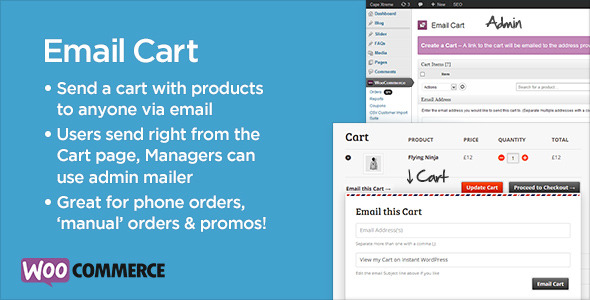
1. Email Cart


email-cart-feature


What it does: You can send any customer a pre-populated invoice that’s ready to checkout. All they need to do is follow the link and they’ll land on the checkout page with the products you put together ready. This is a great way to offer custom quotes and product bundles. Combine it with a robust product inquiry feature, and you can add an effective level of customer service.


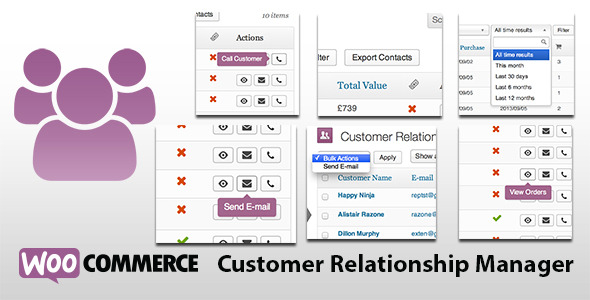
2. CRM Manager

crm-inline-preview


Woocommerce Curstomer Relationship Manager – Using a CRM platform brings tons of adantages when it comes to understanding, managing, and catering to your customer base. And while you can certainly integrate Woocommerce with Salesforce or other larger CRM tools, sometimes those solutions are too robust. That’s why I like this lightweight CRM plugin, which offers great features for a low one-time cost. You can segment and filter customers, then send an email message to them easily.


3. Woocommerce Product Search

live-product-search-590


If you tried the native Woocommerce search feature, you know it’s fairly limited. This enhances the search parameters to include all sorts of extra product information and delivers accurate results.


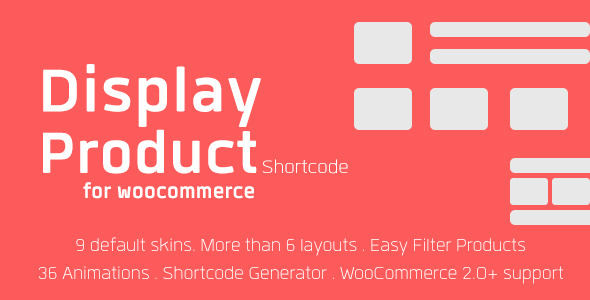
4. Display Product Multi-Layout

banner590x300

If you want to display your product listings in a column format, or switch it up and have them tiled top to bottom, you can use this plugin to do just that. It helps you adjust the way products display across your site, from the category listings, to the single product page itself.


5. Paypal Pro Gateway

banner

Everyone needs a quick and easy way to get setup with a payment processor on their site, and that usually means setting up a Paypal Pro account. You can use this plugin to easily integrate your Paypal account to your website’s checkout for seamless transactions.


6. Table Rate Shipping

tablerateshipping

If you offer a lot of different products that ship from multiple places, using a few different carriers, then you know how complicated shipping can be. This plugin is a lifesaver when it comes to constructing a sensible, rule-based shipping setup for your store.


7. Social Coupons

tcwc-590


8. UPS Shipping Method

ups-shipping-woocommerce

You can integrate a lot of shipping methods into your Woocommerce store, and UPS is one of the obvious popular ones. You can get real time rates, create custom shipping quotes, and more with this handy plugin.


9. Product CSV Import Suite

import-product-csv-woocommerce

Importing products isn’t hard when you have only a few, but try adding a few hundred or more and it becomes a serious chore. This plugin lets you easily bulk import products to your store. Woothemes also has a great version that’s worth checking out (although considerably more expensive).


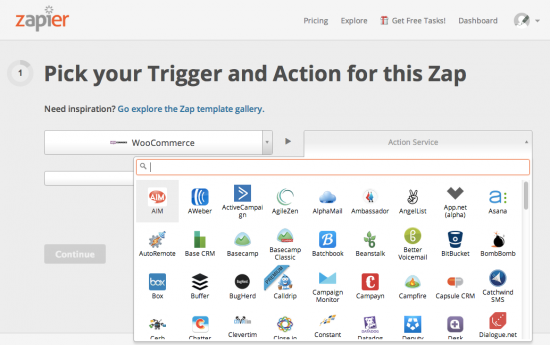
10. Woocommerce Zapier Integration

zapier-add-zap-550x345

Zapier is really cool service that acts as a middleman between two applications. Their aim is to automate the web using these “recipes”. For example, you could send new subscriber information to Mailchimp or Zoho CRM when a new order comes in.


11. Coupon Shortcodes

Woocommerce coupon shortcodes plugin


12. Free Gift Plugin

woocommerce-free-gift-plugin


13. Video Product Tab

video-product-tab-woocommerce-plugin


14. PDF Invoices

WooCommerce_PDF_Invoice_Plugin


15. Woocommerce Ebay Lister

Now you have an easy way to export products to Ebay. With just a few clicks, you can select the products you want to post, and create full ebay listings.


16. Price History/Price Drop Notifications Woocommerce_Price_History_Price_Drop_Notifications_Plugin


17. Image Hover Preview

image-hover-view-woocommerce-plugin

When shoppers are browsing product categories, they can only see small thumbnails of your products. This lightweight plugin lets them hover over those images, and see a larger preview, which helps improve their shopping experience.


18. Custom T-Shirt Designer

wp-ecommerce-custom-tshirt-design-studio-woocommerce-plugin

Here’s an interesting plugin for Woocommerce that lets users create their own t-shirt designs. But it’s not limited to just t-shirts…you can offer custom iphone case designs, cakes, and other items using the custom design interface that it layers onto your store.


19. Amazon Affiliates Plugin

woocommerce-amazon-affiliates-wordpress-plugin

This powerful plugin gives you everything you need to create a fully functional Amazon affiliate store on your own website. You can import hundreds of products from Amazon to be featured, and allow users to checkout on your own site.


20. Braintree Payment Gateway

braintree-credit-card-gateway-for-woocommerce


21. Automatic Checkout Discounts

woocommerce-checkout-discounts

Sometimes you want to have an automatic discount applied to every product in your store – for example, on a Cyber Monday sale you may want to offer a 10% storewide discount. This plugin lets you do just that, and automatically applies the discount to the shopper’s cart.


22. Product Enquiry Form

woocommerce-product-enquiry


23. Advanced Notifications

When a new order comes into your store, chances are a few people need to be notified. If you’re using a drop-shipper, they need to get a copy of the order, along with anyone else you might need in the loop. The Advanced Notifications plugin lets you set up order notifications based on product categories and other filters, ensuring that everyone gets updated as needed when a new order comes in.


24. Bulk Price Edit

bulkpriceedit

If you want to edit prices in your Woocommerce store, you can either export the products to a CSV, adjust them manually, and then re-upload the products to the site or you can go through one by one and do it from the Admin. Both options are time-consuming, and instead, you can use this plugin to make bulk price edits to multiple products from one screen in your admin.


Do you have any suggestions for Woocommerce plugins that you like to use? Post them in the comments, and I’ll update the list with any good ones.


The post 24+ Essential Woocommerce Plugins appeared first on Mike Meisner.